Use the Claude Word Add-in with Anonymization
November 2, 2026
For transactional and in-house lawyers, the most useful AI task is often the simple: analyze a draft agreement and suggest tracked changes in the .docx itself. Claude for Word is a popular, simple tool to analyze the open document, and provide suggested tracked change edits for the attorney to accept or reject.
However, an original draft carries confidential party names, pricing, account numbers, and the document's own metadata; without treating the document, Claude sees everything. CamoText is a simple tool to help: it masks sensitive terms fully offline, writes a new formatted anonymized .docx, and leaves the original draft untouched. Use that anonymized copy in Word and let the AI add-in work. When you want the real terms back, CamoText's Reinsert Terms feature restores them locally into the Claude-edited document with your saved key.
The result is an AI-edited draft whose analysis never included personally identifiable information or document metadata. The same pattern works for any Word-native assistant that edits the open file; Claude's add-in is a popular example for AI-assisted tracked changes inside the document.
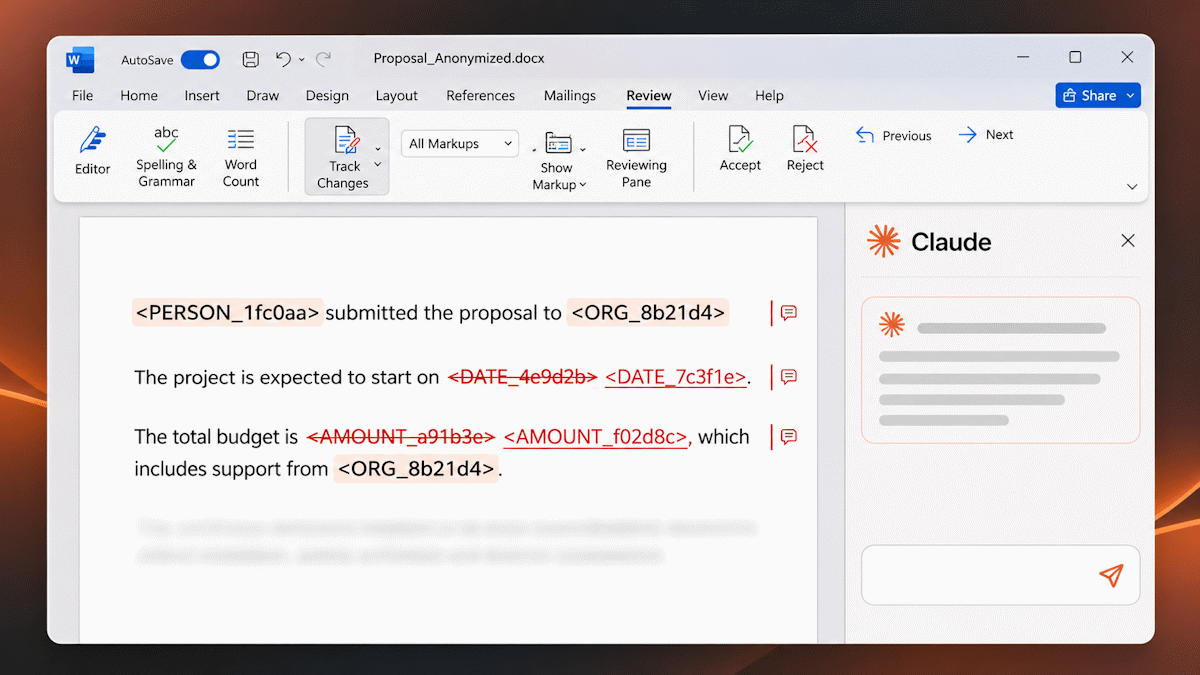
Word Documents are Data-Rich
Pasting a contract into a chat window or opening the authoritative file in an AI add-in sends the text of the draft to the provider. A Word file also carries hidden data: author and last-modified-by fields, file paths, revision identifiers, and comments that never appear in the body. Those details identify the client, the matter, and often the firm, even when the prompt itself looks generic.
Provider terms, enterprise controls, and a data-processing addendum describe what happens after the text leaves the machine. Masking first means the add-in session is about clause structure, allocation of risk, and missing protections, using masked unique placeholders in place of PII.
CamoText does this offline on the user's computer. It reads the document, replaces detected and priority terms with hashed placeholders such as <ORGANIZATION_8b42de>, strips metadata from the output, and writes a new formatted .docx. The source file is not overwritten, so it can stay on a share drive, in a document-management checkout, or wherever the matter file already sits. Formatting is preserved on that output, and again when you reinsert terms into the edited copy, so each turn is a Word document you can open, compare, and file.
Anonymized AI Word Add-in Workflow
1 Load the original draft
Load it in CamoText from a share drive, DMS export, or anywhere. CamoText reads the content and writes a separate output. The source file stays as it was.
2 Mask sensitive terms
Click Anonymize. Review the key and the output, then save the anonymized .docx; formatting is preserved.
Word — Claude add-in
3 Open the anonymized copy
In Microsoft Word, open the masked .docx. Ask Claude to analyze the draft and insert tracked changes for your review. The add-in sees placeholders and clean document properties, not the parties or the file's history.
Your computer — fully local
4 Reinsert Terms (optional)
Load the Claude-edited document in CamoText and run Reinsert Terms with the anonymization key still active (or use Deanonymize if you need to load the key from disk). Save edited_Doc locally. Sensitive items return in full; the original draft is still untouched.
Step-by-Step Details
-
Keep the authoritative draft where it already lives
Load the draft into CamoText, whether it sits on a mapped share, a checked-out working copy, or your desktop. CamoText extracts the content it needs and writes a new file. The original remains the version of record.
Important: Open the anonymized output in Word, not the source draft. The add-in works on the document that is open. -
Use CamoText's Settings for custom placeholders
In User Settings → Priority Terms, tag the terms Claude should be able to tell apart without learning who they are. A priority label becomes part of the placeholder, so the model can follow roles across the agreement:
- CLIENT — the party you represent
- COUNTERPARTY — the other side
Auto-detected entities keep their category in the token, for example
<PERSON_4f6bb1>or<ORGANIZATION_8b42de>. The same string receives the same hash throughout the document, so cross-references stay consistent. Exclude categories that are not sensitive for this matter (for example, DATE). -
Anonymize and save the masked
.docxLoad the draft and run Anonymize. CamoText replaces detected and priority terms, removes metadata and hyperlinks from the output, and preserves document formatting in the new file. Save that file under a clear name, such as
Agreement_anon.docx, in a working folder used only for this review.Tip: On the first pass for a client, check the Anonymization Key for false positives and scan the output for jargon the detector missed. Highlight and anonymize stragglers, or add them as Priority Terms and run again. Later documents in the same matter reuse those priorities. -
Analyze and apply tracked changes in Word
Open
Agreement_anon.docxin Microsoft Word with the Claude add-in, and turn on the add-in's tracked changes mode so you see and review the edits. Tell Claude who you represent by placeholder, what kind of agreement it is, and any other preferences. A short instruction you can reuse:Word add-in instruction Role: counsel to <CLIENT_23af1c>.
Document: the open draft. Infer the agreement type from the text.
Task: review for one-sided risk, missing protections, and ambiguous operative language. Insert proposed revisions as tracked changes in this document.
Placeholders: hashed tokens such as <CLIENT_23af1c>, <COUNTERPARTY_9c10aa>, and <MONEY_bb19e0> stand in for real names and figures. Treat them as the defined parties and amounts. Do not flag the tokens as blanks, and do not invent real names to replace them.
Focus: indemnities, limitation of liability, termination, assignment, and substantive departures from market standard or precedent. Leave boilerplate that is already mutual unless it conflicts with those points.Claude reads the open anonymized file. Suggested edits land in Word as tracked changes you can accept, reject, or rewrite. The placeholders are consistent throughout the document. What the add-in does not receive is the party's legal name, the purchase price, or the author metadata that rode along in the original.
Save the Word file when the review is done, for example
Agreement_anon_edited.docx. That file is still masked; alternatively, one may decide to simply manually input changes into the original draft using Claude's suggestions as a guide. -
Reinsert Terms into the Claude-edited document
Open the edited anonymized
.docxin CamoText and use Reinsert Terms with the key from this anonymization (note: tracked changes will be accepted as revisions in the document). CamoText replaces each placeholder with the original sensitive text and writes another formatted document. Save that file locally as youredited_Doc.Reinsertion runs on your computer. The key never goes to Claude, and Claude never sees the restored draft. The share-drive original is still the file you started with;
edited_Docis a new output that carries the new edits (that can be shown by Word's Compare feature against the original).Tip: If you would rather keep control of every edit yourself, skip reinsertion and apply the ideas you accept onto the authoritative draft by hand. Reinsert Terms is for the case where you want Claude's tracked changes, with the confidential text restored, as a working document.
What the Add-in Sees vs. What Stays on Your Machine
The add-in can still recognize a share purchase agreement, test whether the cap is tied to the purchase price, and propose a tracked change to the notice clause. It cannot see who the seller is, what the price is, or who authored the file.
Why Placeholders Still Support a Useful Redline
Keep the relative context, exclude the sensitive specifics:
- Formatting survives each turn. The anonymized save is a
.docx. Claude's tracked changes are Word revisions in that file. Reinsert Terms writes another formatted.docx, so you are not reconstructing a draft from chat text. - One tag, one entity. Every verbatim mention of a sensitive entity has the same tag, including in definitions, cross-references, and signature blocks.
- Roles stay visible. Priority tags such as
<CLIENT_23af1c>tell the model whose interests to protect without disclosing the client's name. - Avoid version control conflicts. Extraction and a new output mean a share-drive original is never the file the add-in modifies.
Best Practices
- One anonymized working file per review. Name it so nobody opens the live draft in the add-in by habit.
- Priority Terms for a matter. Custom-tagged client and counterparty are simple ways to easily provide context.
- Keep the anonymization key off any folder the add-in or another agent can read. The key is the map from placeholders back to the PII.
- Check the results. Detection is strong but still contextual and subjective.
- For folder-level agents, batch anonymize all files in a matter. If the task is multi-file work on disk rather than tracked changes in the open Word document, follow Use Claude Cowork with Anonymization and give the agent only a folder of masked copies with consistent tags.
Conclusion
Analyzing a draft agreement and suggesting tracked changes, without handing over the confidential details, is the AI use case transactional and in-house lawyers ask for most. CamoText makes the path short: mask the draft offline, save a formatted anonymized .docx, let the Claude add-in edit that copy in Word, and, if you want the deal terms back in the AI's revisions, reinsert them locally.
The original draft is never overwritten. Claude works on placeholders in a metadata-free document. The final edited_Doc is produced on your computer, with the sensitive items restored, after the model has finished.